Diagnostic orders

Lab and imaging orders in seconds

Doctors select lab tests and imaging during the visit, using order sets linked to the diagnosis. Order forms and result forms print in the Ministry of Health format, and results return directly to the patient record.
  • Order sets by diagnosis
  • Search by name or LOINC code
  • Slips following the TT 32/2023 template
  • Results into the record
clinic.medagents.vn
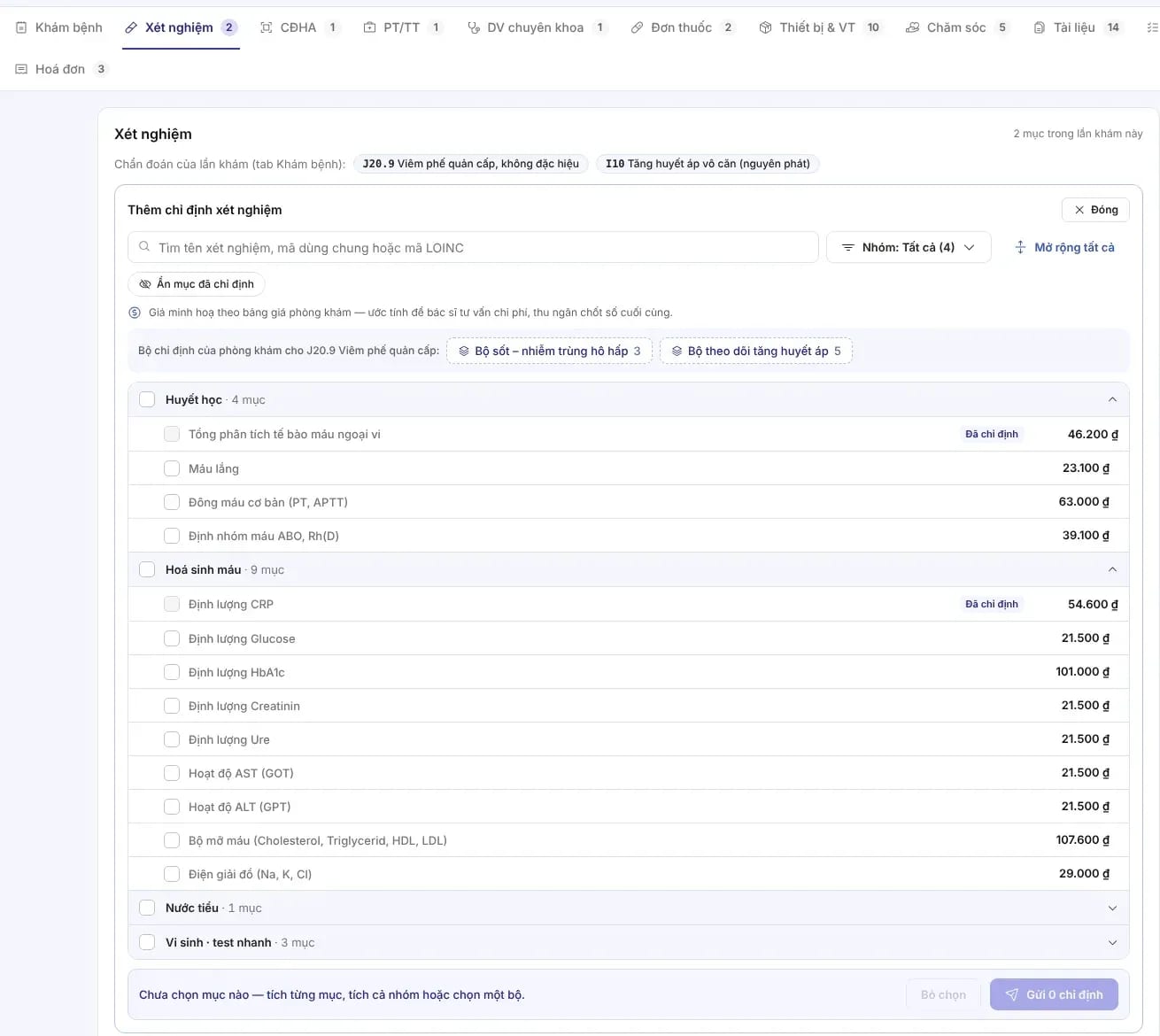
The screen for adding lab orders during a visit: search by name or LOINC code, order sets by diagnosis, and a catalog by group with prices

MedAgents clinic portal interface

Smart orders

Fewer clicks, the right service, the right patient

Orders sit in the encounter tab and share the diagnosis and record with the visit notes.

Order sets by diagnosis

Choose a set such as “fever – respiratory infection” or “hypertension monitoring” to order the whole group in one tap.

Fast search, standard codes

Search by name, shared code or LOINC code; the catalog is grouped by hematology, biochemistry, urinalysis and microbiology.

Clear pricing & payment

Display unit prices from the facility price list, so costs can be discussed before the order is sent.

Specimen collection tracking

Statuses for each order: awaiting sample collection, in progress, result released.

Diagnostic imaging

X-ray, CT, ultrasound and Doppler with priority level and the wait time for results to be read.

Results into the record

Results are linked to the encounter, and out-of-range values are flagged so the doctor can read them quickly.

Diagnostic imaging

Track every order until the result arrives

Each diagnostic imaging order carries a form number on the official template, a priority level, and an execution status within the visit.

  • Form numbers per template: for example, MS 08/BV-02 for an X-ray order slip.
  • Priority & wait time: routine or urgent; see when the image was taken and how long it has waited to be read.
  • Clear status: in progress, awaiting results, returned.
  • Accompanying diagnosis: the visit's ICD-10 code is shown automatically when placing orders.
clinic.medagents.vn
The list of imaging studies ordered during the visit, with order number, priority, amount and status
clinic.medagents.vn
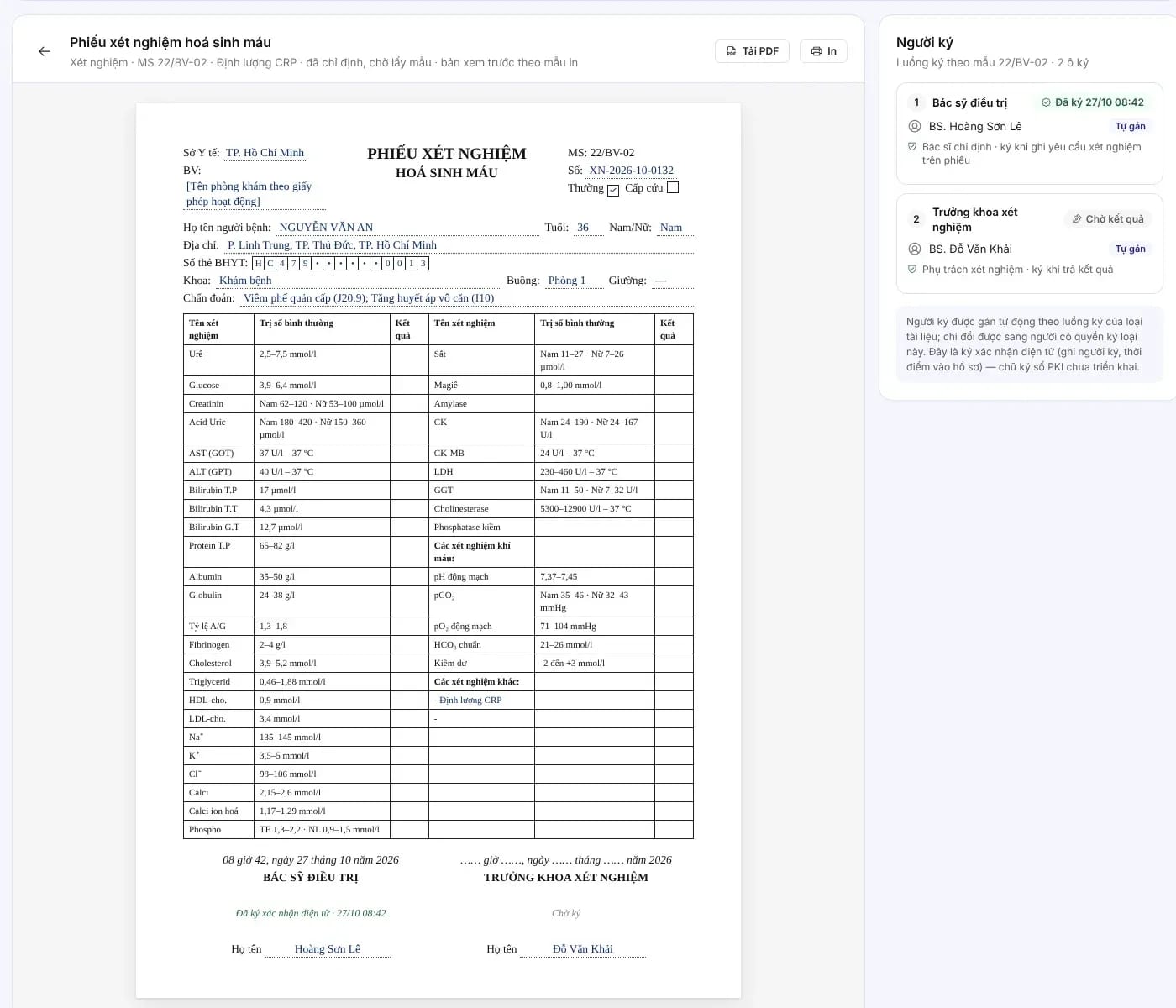
Preview of a templated lab order slip with the signer flow

Order form

Order slips printed from the very data you selected

Lab order forms are generated from a template, drawing in the patient information, the diagnosis, and the list of ordered services.

  • The correct template: the layout follows the healthcare facility's own form templates.
  • Signer flow: the ordering doctor and then the department head sign in sequence.
  • Download the PDF or print: no re-entering information.
  • Stored under documents: the form sits in the Documents tab of the episode of care.

Printable forms

Result forms on Ministry of Health templates

Lab and imaging result forms carry a form number (MS), are electronically signed and printed from the same data held in the record.
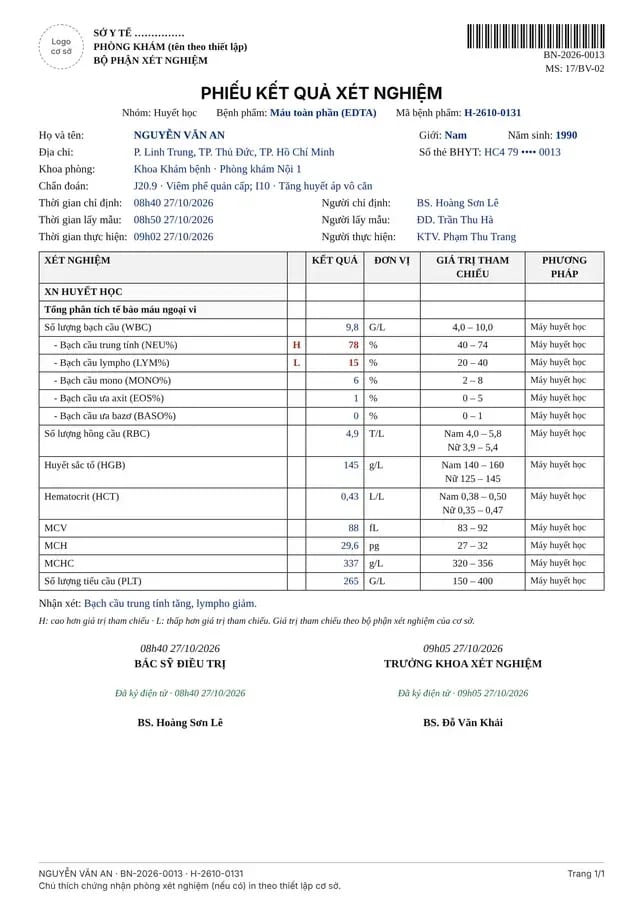
Hematology lab result form following template MS 17/BV-02
MS 17/BV-02Hematology lab result formH/L flags for values outside the reference range, method, sample collector, performer.
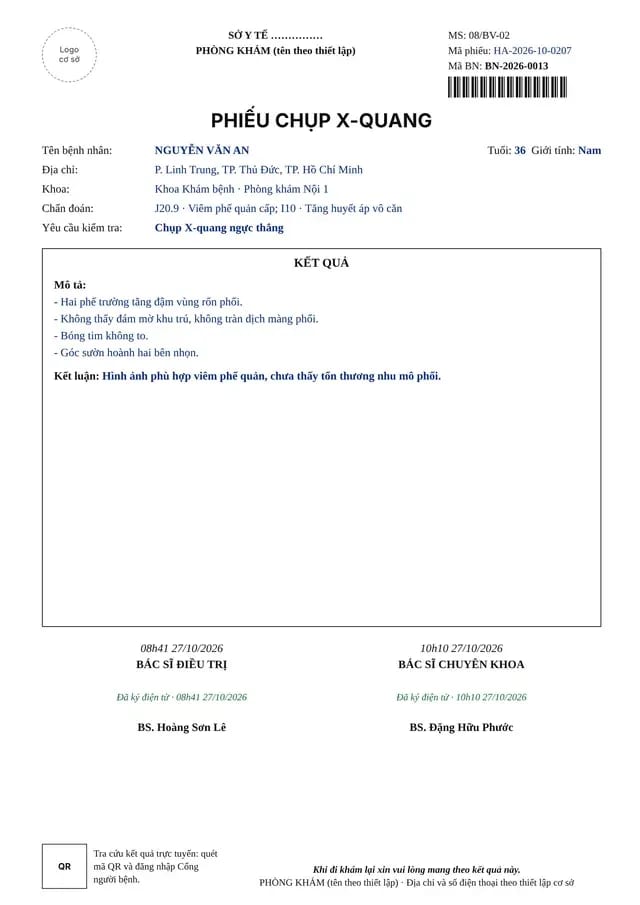
X-ray request form following template MS 08/BV-02
MS 08/BV-02X-ray report formDescription, conclusion, signatures of the treating physician and the specialist, and a QR code for looking up results.
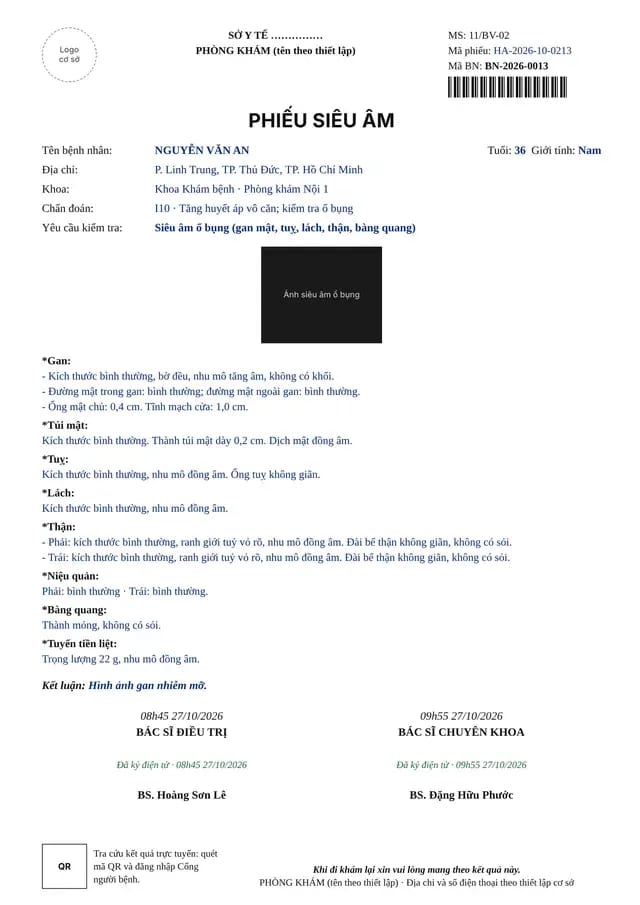
Ultrasound form following template MS 11/BV-02
MS 11/BV-02Ultrasound reportOrgan-by-organ description, illustrative images and a templated conclusion.

Process & compliance

From the order to the result in the record

Each step records who performed it, when, and a signature, so the diagnostic record is complete when it is reviewed.

  1. Step 01
    OrderThe doctor selects a service or order set and links the ICD-10 diagnosis for the visit.
    Lab testsImagingOrder sets
  2. Step 02
    PerformA nurse collects the sample and a technician performs the test; the status is updated at each step.
    Sample collectionPerformedPriority
  3. Step 03
    Return resultsResults are entered or received from the system, then approved and signed by an authorized person.
    Reference rangeH/L flagsSign-off
  4. Step 04
    Read & shareDoctors read within the record; patients look results up by QR code and through the patient portal.
    RecordsQRPatient portal
TT
Circular 32/2023/TT-BYT

Paper forms and medical slips, including the group of diagnostic order slips, are implemented following the guidance in Official Letter 65/KCB-QLCL&CĐT. In MedAgents, order slips and result slips for lab tests and diagnostic imaging are built according to form code numbers; data is stored following HL7 FHIR R4 (ServiceRequest, Observation, DiagnosticReport).

Connections to lab analyzers, LIS and PACS are assessed and tested for each facility.

FAQ

Frequently asked questions

Can results be received automatically from lab analyzers?

The device types, middleware, protocols and test codes need to be reviewed in a discovery session. LIS and PACS integrations enter the scope once the transfer flow and result reconciliation are defined.

Can the facility create its own order sets?

Yes. Order sets by diagnosis and the service price list are configured against the facility's technical service catalog.

Do printed forms follow the Ministry of Health templates?

Order forms, lab result forms and imaging reports follow the template codes issued under Circular 32/2023/TT-BYT; facility details are printed according to configuration.

Where do patients view their results?

Patients scan the QR code on the slip or open the patient portal to view the results the facility allows to be shared.

Diagnostics connected seamlessly to the visit

Share the procedure catalog and form templates your facility uses, and MedAgents will propose a suitable configuration.

Compliance commitment
  • Data stored on infrastructure in Vietnam
  • Meets National Prescription data exchange requirements
  • Law 91/2025/QH15 · NĐ 356/2025
  • Information security level 3+ · HIPAA
View security & data