Administration & operations

Modern clinic management, the full picture on one screen

Clinic owners view revenue, visit volume, patient flow and each person's task progress in real time. Less reliance on manual reports, with decisions based on the data held in the system.
  • Periodic overview reports
  • Task assignment & progress tracking
  • Coordinate the visit flow
  • Staff & permissions
clinic.medagents.vn
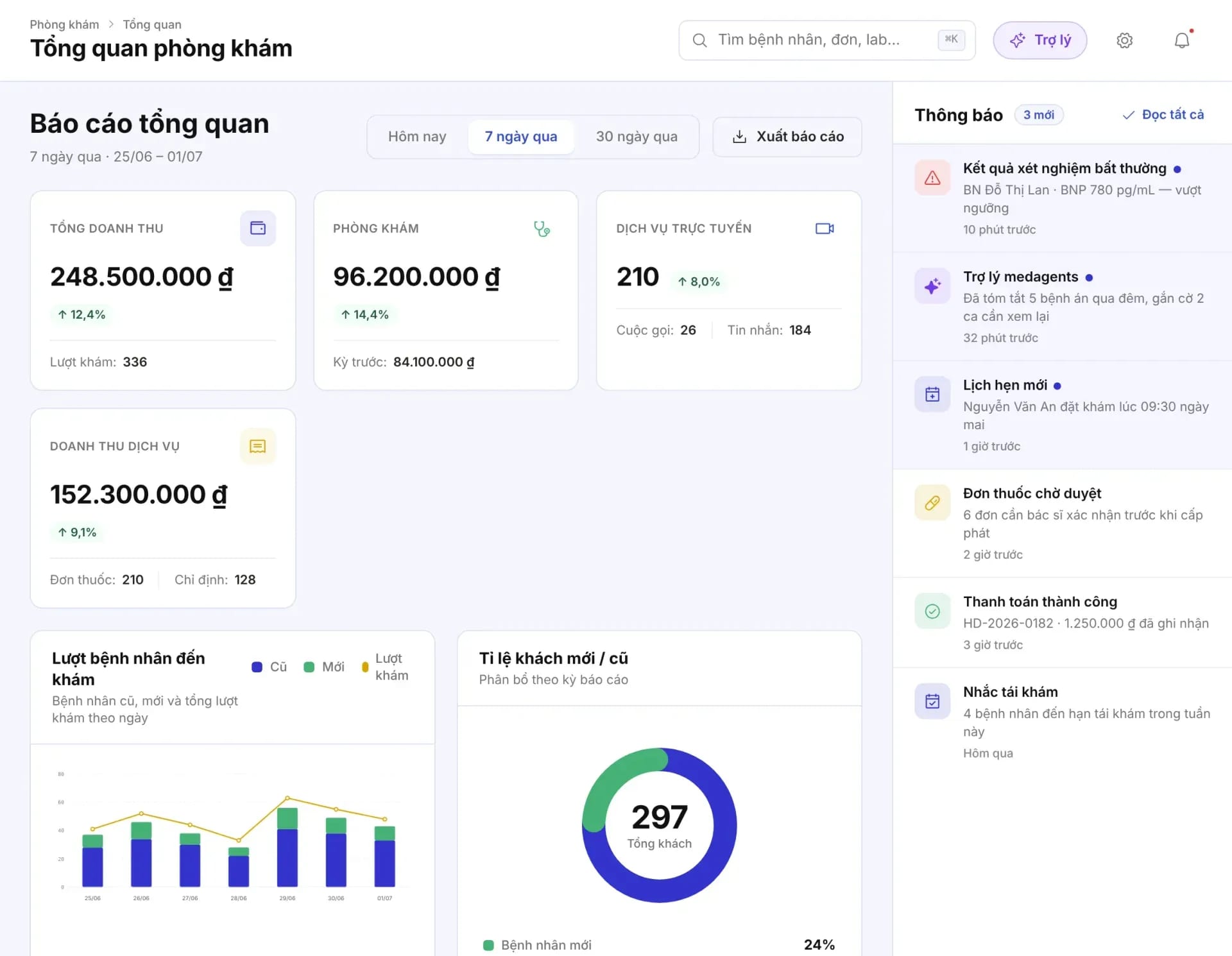
Clinic overview: total revenue, visits, online services, service revenue, a patient volume chart, and notifications to handle

MedAgents clinic portal interface

Value for clinic owners

From managing by intuition to managing with data

Consultations, billing, and task assignment all take place in MedAgents, so management figures are available without re-entering data.

Real-time figures

Revenue, visit volume, and new versus returning patients update each period; no waiting for a month-end roll-up.

Tasks with a clear owner and deadline

Every order and task has an assignee, a priority and a due time, so it is clear which ones are running late.

The right person, the right permissions

Each role sees and acts only on its own work; permission changes are written to the audit log.

Technology handles the repetitive work

Notifications, priority suggestions, and threshold alerts so the team can focus on patients.

A day in administration

Grasp your facility in minutes, whether at the clinic or traveling

The administrative screens share data with the front desk, doctors, and cashier, so the clinic owner sees exactly what is happening.

  1. Step 01
    Start of dayReview the overview and the notifications to handle: abnormal results, prescriptions awaiting approval, follow-up reminders.
    OverviewNotifications
  2. Step 02
    During the dayTrack the visit flow step by step and spot patients waiting beyond the threshold.
    Visit flowWait-time alerts
  3. Step 03
    Assign & trackAssign clinical orders and tasks; view new, in progress, urgent, and completed items.
    OrdersKanban
  4. Step 04
    End of periodCompare revenue and visit volume across periods; export reports for the staff briefing.
    ReportsExport file

01Overview report

A full view of operations by day, week, and month

One screen for the clinic owner: revenue, visits, online services, and patient mix, along with notifications that need attention.
  • Quick period selection: today, 7 days, 30 days; compare with the previous period.
  • Revenue by source: the clinic, online services, prescriptions, orders.
  • New and returning patients: a chart of visits by day and the share of new patients.
  • Export reports: download for the handover meeting or to send to accounting.
clinic.medagents.vn
Clinic overview: total revenue, visits, online services, service revenue, a patient volume chart, and notifications to handle
clinic.medagents.vn
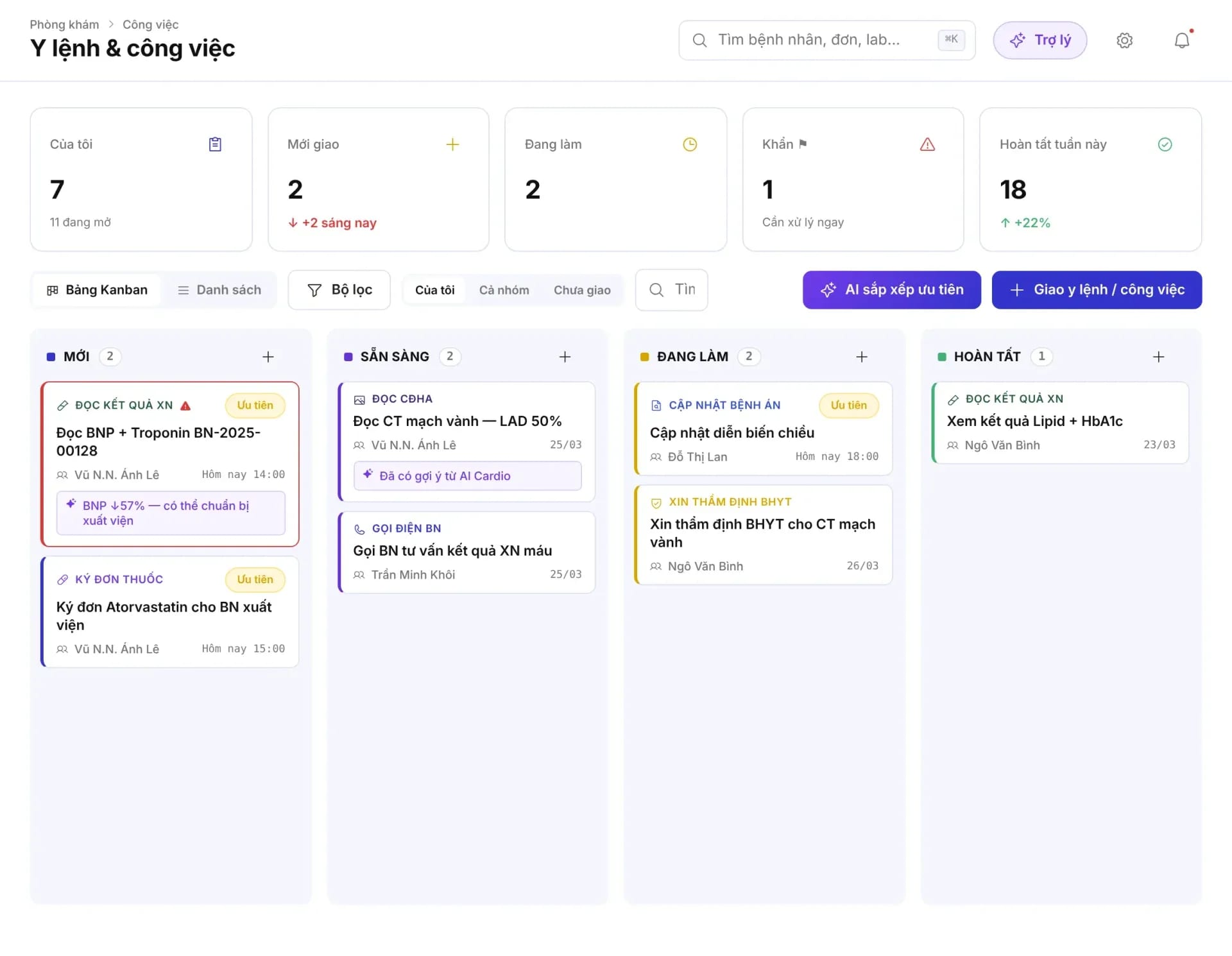
Clinical orders and tasks screen: task count tiles and a Kanban board by status

02Orders & tasks

Clear task assignment, tracked through to completion

Medical orders and internal tasks are assigned to the right person, with a priority, a due date, and a status on the Kanban board.

  • Task counts at a glance: mine, newly assigned, in progress, urgent, completed this week.
  • Kanban board: New → Ready → In progress → Done; view as a board or as a list.
  • Priority & due date: urgent cards are flagged and show the assignee and the deadline.
  • Prioritization suggestions: AI proposes an order; the person in charge decides.

03Outpatient visit flow

Know where each patient is and how long they have waited

The visit flow is divided into steps, and each patient is a card showing the wait time and the allowed wait threshold.
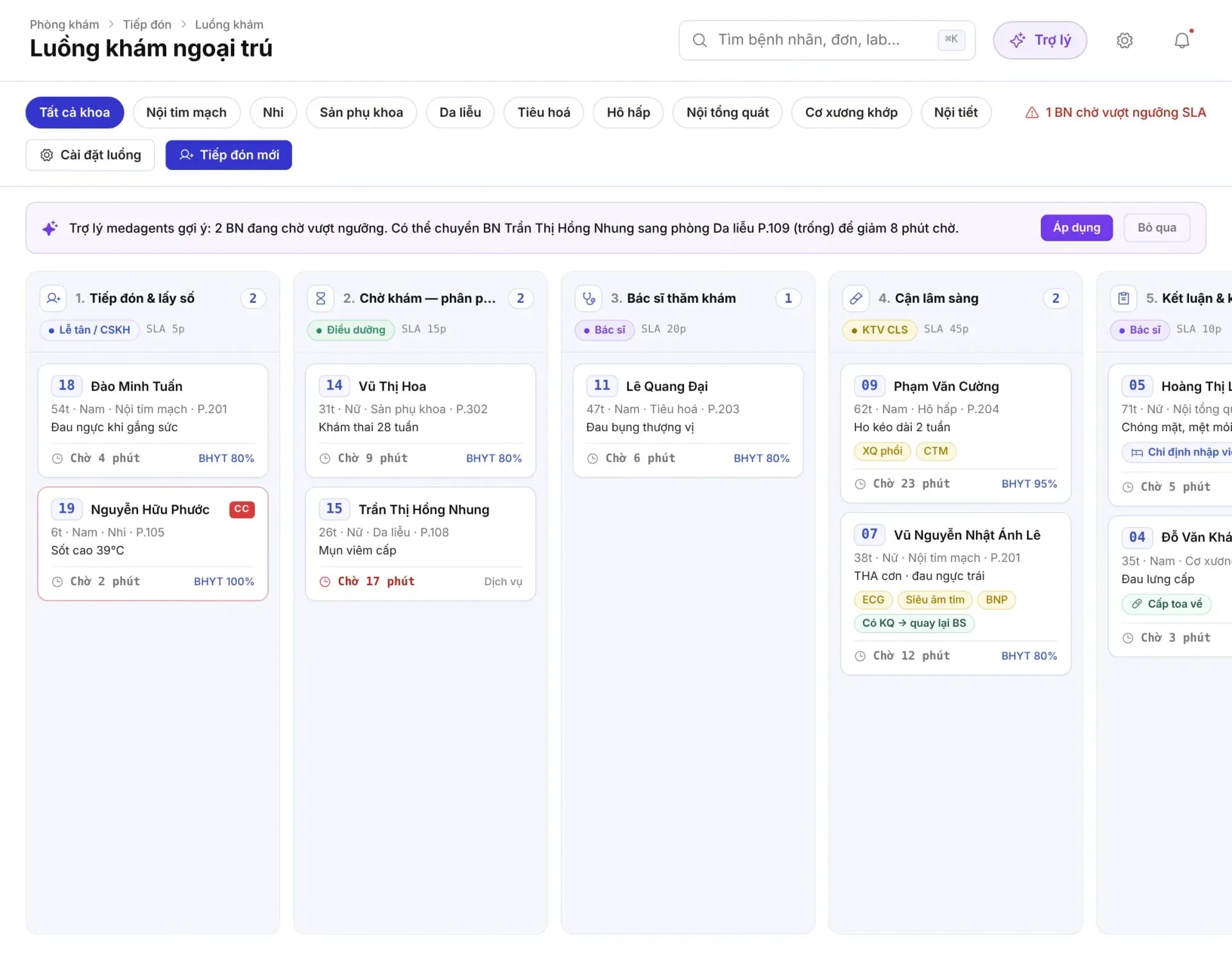
  • Step by step: intake, waiting, the doctor's examination, diagnostics, conclusions.
  • Wait threshold: cards past the threshold are flagged so they can be coordinated in time.
  • Filter by specialty: internal medicine, obstetrics and gynecology, dermatology, respiratory medicine…
  • Coordination suggestions: the assistant proposes moving a patient to another room when one room is overloaded; staff choose to apply or dismiss it.
clinic.medagents.vn
The Outpatient visit flow screen with columns by step and patient cards showing wait time
clinic.medagents.vn
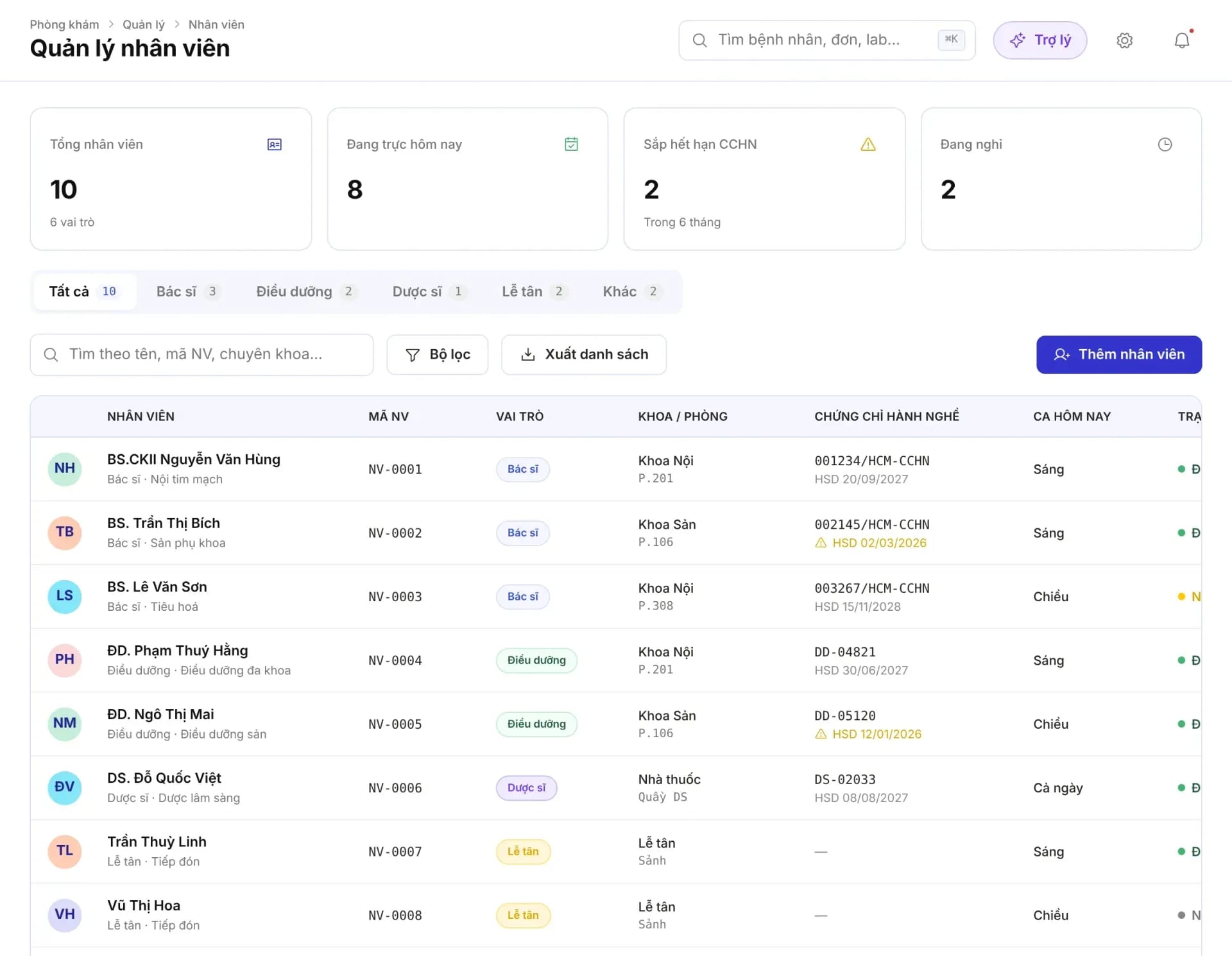
Staff management screen: overview cards and a staff table with practice certificates and shifts
clinic.medagents.vn
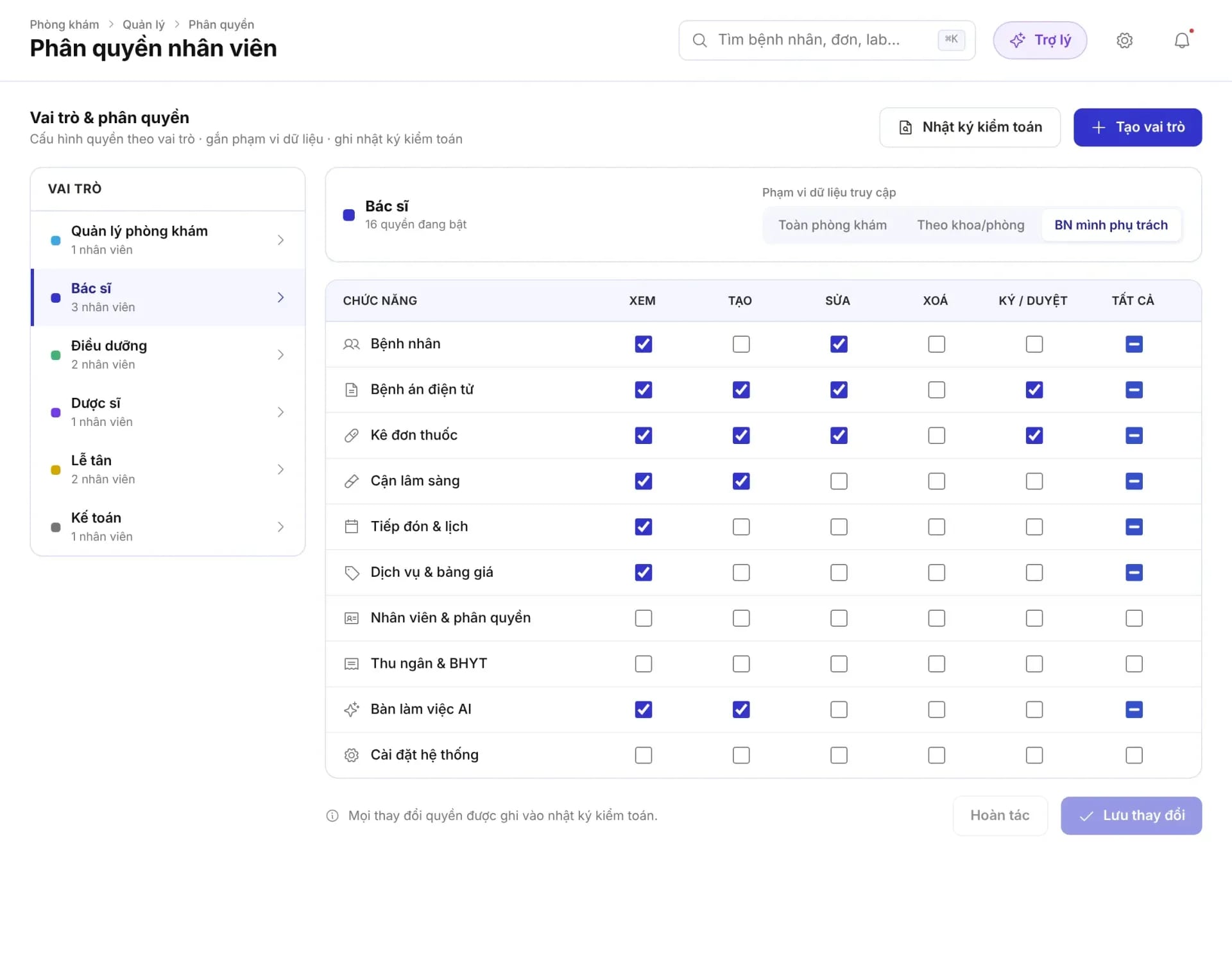
Staff permissions screen: roles, data scope and a permission matrix by feature

04Staff & permissions

A transparent team, with clear authority

A staff list with roles, departments, practice licenses and shifts; permissions are assigned by role with a defined data scope.

  • Staffing status: total staff, on duty today, and on leave.
  • Practice licenses: track license numbers and expiry dates, with reminders before expiration.
  • Permission matrix: view, create, edit, delete, and sign off, per function.
  • Audit log: every change to permissions is recorded.

05Billing & invoices

Accurate, complete, and reconcilable

Invoices are generated from the services ordered, separating the portion covered by health insurance from the portion the patient pays; the figures flow directly into revenue reports.
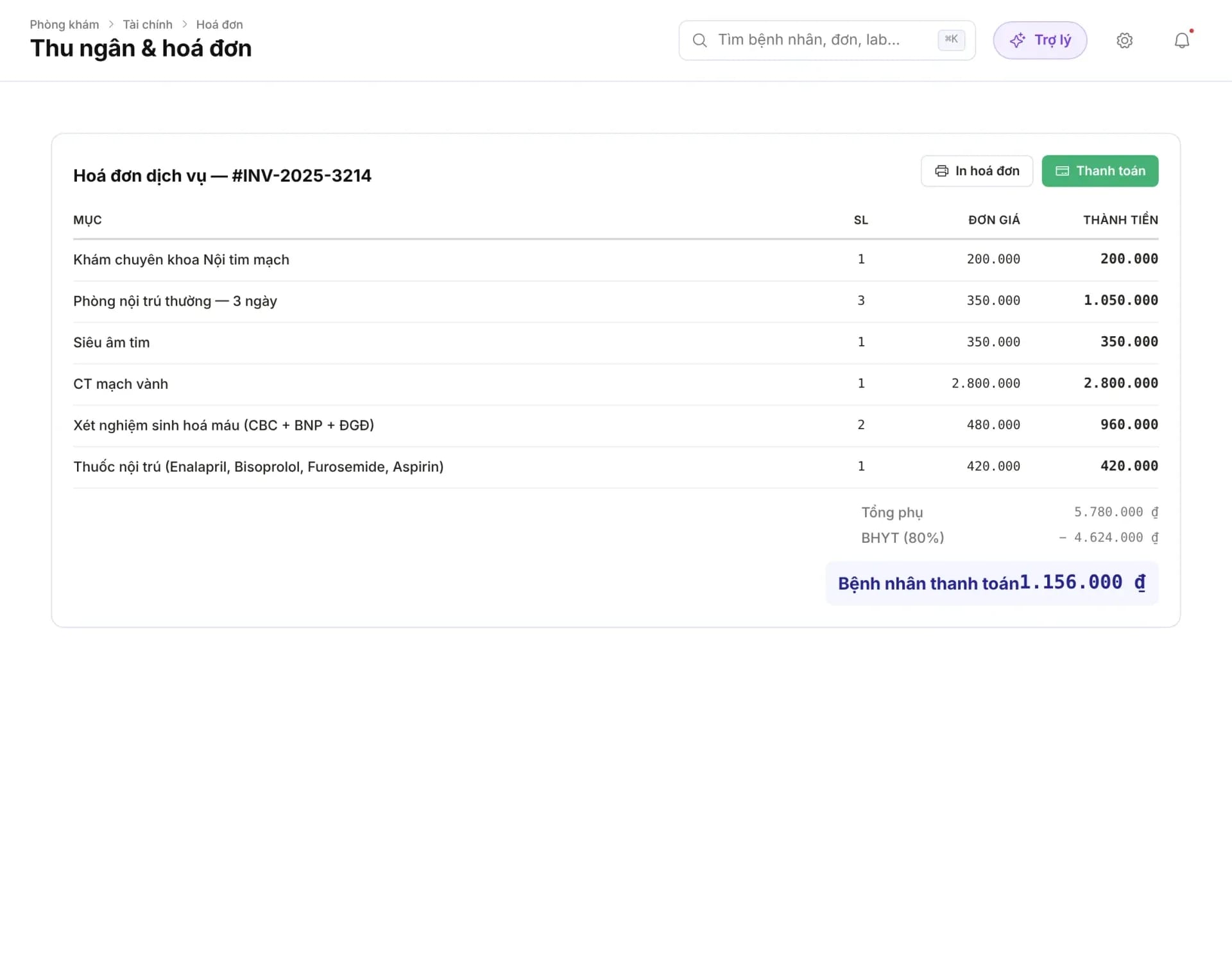
  • Generated from services: consultation, procedures, lab tests, and medications in the visit.
  • Health insurance and patient: shows the subtotal, the BHYT share, and the patient's share.
  • Printing and payment: print the invoice and record the payment right at the counter.
  • Reconciliation: reported figures can be traced back to the source invoice.
clinic.medagents.vn
The Cashier and invoice screen: service details, the health insurance (BHYT) portion and the amount the patient pays

Putting technology strengths to work

Technology supports, people decide

The AI assistant at work

Record summaries, priority suggestions, and coordination proposals. AI content must be reviewed by an authorized person before use.

Source-based answers from the record

The doctor selects documents in the record, asks questions and checks the answers against the selected sources. The doctor retains decision-making authority.

Proactive notifications

Abnormal results, prescriptions awaiting approval, payments, and follow-up reminders are routed to the right person.

Security & access control

Role-based permissions, activity logs and data on the FHIR R4 standard.

Differences in management

Managing a healthcare facility the way the digital era works

The usual approachWith MedAgents
Track revenueWaiting for accounting to consolidate at the end of the monthView by day, week, or month right on the screen
Assign taskWord of mouth and group chats, easily forgottenWith an assignee, a due date, a status, and tracking until it is done
Patients waiting too longKnow when a patient complainsAlerts when the wait threshold is exceeded
Practice licenseTracking with spreadsheetsReminders before expiry
Access rightsShared accountsRole-based permissions, with an activity log

Scope of use: operational reports do not replace accounting reports, insurance assessment, or evaluation of treatment effectiveness. The definition of each metric is agreed during implementation.

FAQ

Frequently asked questions

Can the clinic owner view this on a phone?

The clinic portal runs in a browser; it can be opened on a tablet or a phone to view the overview and the task list.

Where do the report figures come from?

Drawn from the visits, invoices, and payment statuses held in the system. When a change needs explaining, the manager reconciles it against the records and source documents.

Does it calculate treatment effectiveness or adherence rates on its own?

Do not infer it from visit volume. The metric, denominator, measurement period and source data have to be defined before it goes into a report.

Does AI decide on behalf of a manager or a doctor?

No. AI only suggests and summarizes; clinical decisions belong to the doctor, and coordination decisions belong to the responsible staff member.

Can we limit who sees reports?

Yes. View access is limited by role and data scope: the whole clinic, by department, or only the patients the user is responsible for.

Manage the clinic with data, not intuition

Share your facility model and how you manage it today, and MedAgents proposes a suitable set of reports and permissions.

Compliance commitment
  • Data stored on infrastructure in Vietnam
  • Meets National Prescription data exchange requirements
  • Law 91/2025/QH15 · NĐ 356/2025
  • Information security level 3+ · HIPAA
View security & data