
Patient engagement

Connect with patients every day, retaining them through a distinctive experience

Multichannel messaging, timely appointment reminders, approved guidance content, and feedback collection, all on one platform. Patients feel looked after even when they are not at the clinic, and the facility builds a long-term relationship instead of disconnected visits.
  • Multichannel inbox
  • Appointment reminders & tasks
  • Approved instructional content
  • Collect feedback
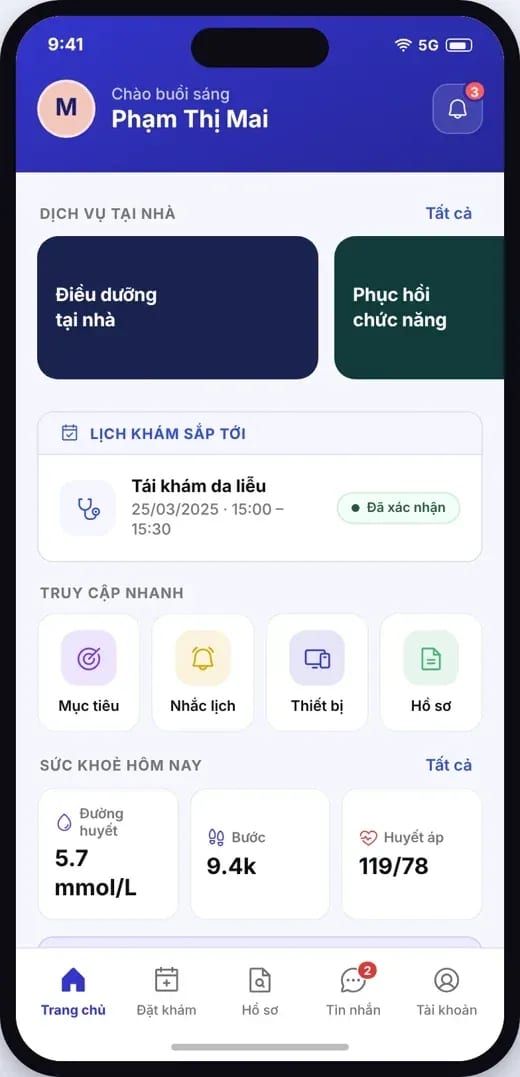
Patient app: home screen with upcoming appointments, quick access, and today's health
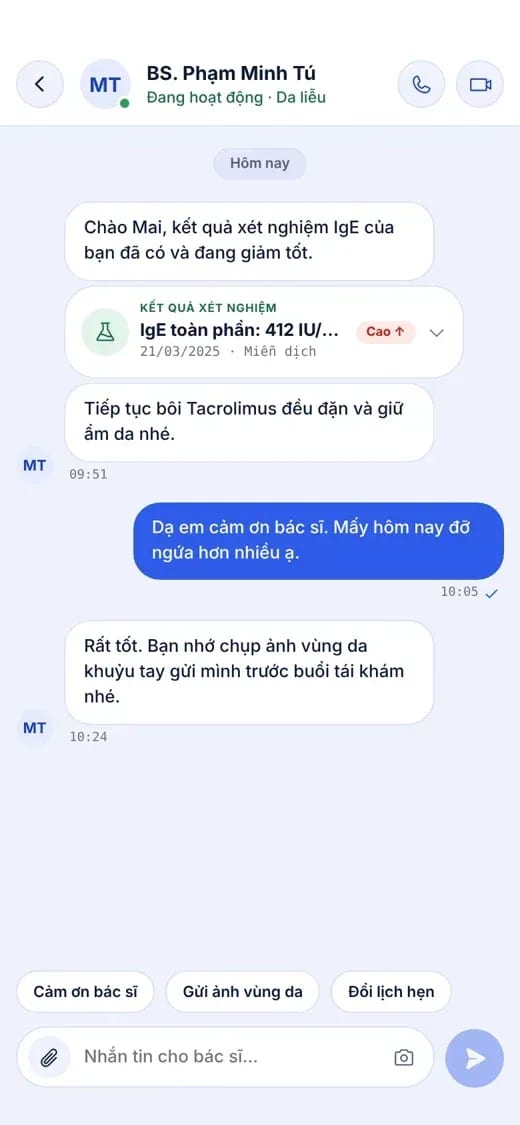
Patient app: chat with the doctor, with lab results sent in the conversation

Why engagement matters

In the digital age, patients choose the place that stays connected with them

Clinical quality is the foundation. How a facility talks, reminds and listens is what patients remember and recommend to others.

Coming back because they feel cared for

Patients stay with a facility that keeps them in mind between visits, not only when they come in.

Fewer missed appointments

Reminders at the right time on the right channel help patients come in or reschedule rather than miss the appointment.

Better treatment adherence

Clear instructions, medication reminders, and measurement prompts help patients follow the plan the doctor has set.

Service that improves every day

Feedback after each service visit tells the facility what needs to be improved, before the patient leaves.

The engagement journey

Present at every touchpoint, not only inside the clinic

Each stage of the patient journey has a suitable way to connect, all sharing the same record on MedAgents.

  1. Stage 01
    Before the visitAppointment booking, confirmation, and reminders; preparation instructions before arrival.
    Appointment reminderPreparationReschedule
  2. Stage 02
    During the visitVisit information, results, and instructions go straight to the patient app.
    ResultsInstructionsPrescription
  3. Stage 03
    Post-visitReminders to take medication and record measurements; questions about the service experience.
    Medication remindersResponsesInstructions
  4. Stage 04
    Between visitsChat when needed, care content by service, and follow-up visit reminders.
    MessageContentFollow-up visit

01Multichannel inbox

Every message into one inbox

Messages from Zalo OA, Messenger and the patient app are handled centrally by the team in the clinic portal, linked to the correct record.
  • One place to reply: the front desk, nurses and doctors respond according to assignment.
  • In the right context: match the contact against the record before linking them.
  • Clear submission status: pending, sent, failed to send.
  • Chat with clinical content: send results, prompt a photo of the area being monitored, and reschedule appointments right inside the conversation.
Zalo OAMessengerFacebook PageApp
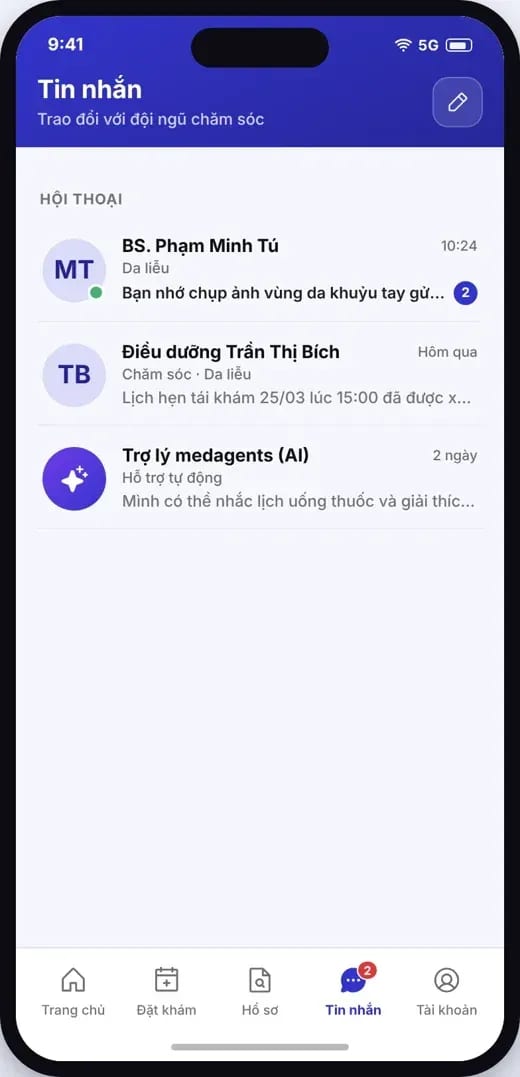
Patient app: list of conversations with doctors, nurses, and the assistant
Patient app: chat with the doctor, with lab results sent in the conversation
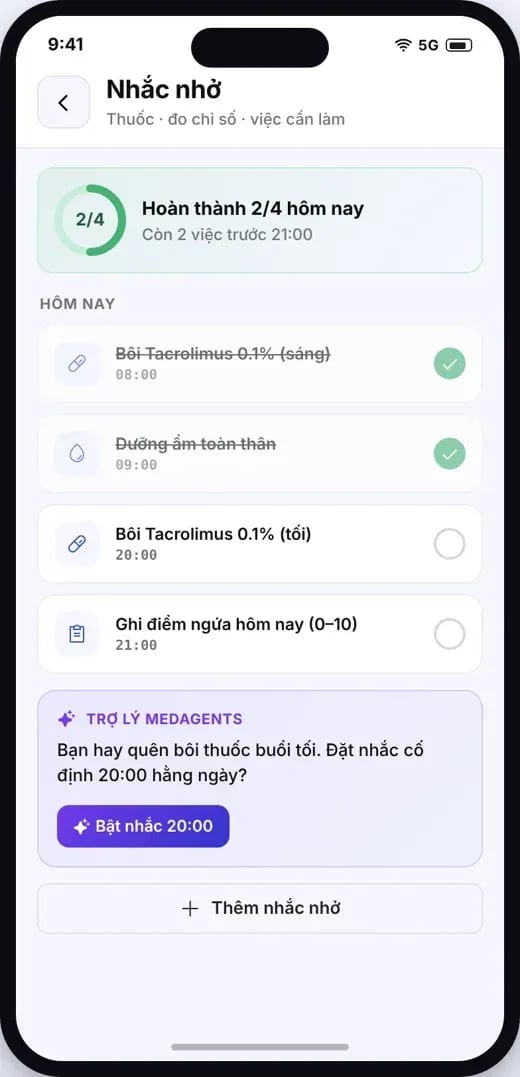
Patient app: today’s reminders by the hour

02Schedule reminders & tasks

Timely reminders, so patients do not miss them

Appointments, medication times, measurements, and symptom scoring are prompted according to the plan the doctor sets and the facility's schedule.

  • By appointment: confirmation, reminders before the visit, rescheduling suggestions when the patient is unavailable.
  • From the prescription: reminders at dosing times, with a mark-as-taken action.
  • By care plan: take measurements, record symptom scores, capture follow-up photos.
  • What remains for staff: cases with no response are added to a follow-up contact list.

03Guidance content

Timely guidance, reviewed and approved by a doctor

A library of instructional articles by service, with a clinical reviewer and a review date; delivered through the app, by message, or published on the facility website.

  • By service: content before and after the service is used.
  • Clinical approval: records the responsible person and the review date.
  • Several publishing channels: app, messaging, website CMS.
  • Version updates: review again whenever the process or the reference sources change.
GastroenterologyClinically reviewed

Preparation before endoscopy

Sent 2 days before the appointment

SurgeryClinically reviewed

Wound care after a procedure

Sent after the visit ends

CardiologyClinically reviewed

Blood pressure monitoring at home

Submitted when joining the program

Sample titles illustrating how the library is organized; the content is written and approved by the facility.
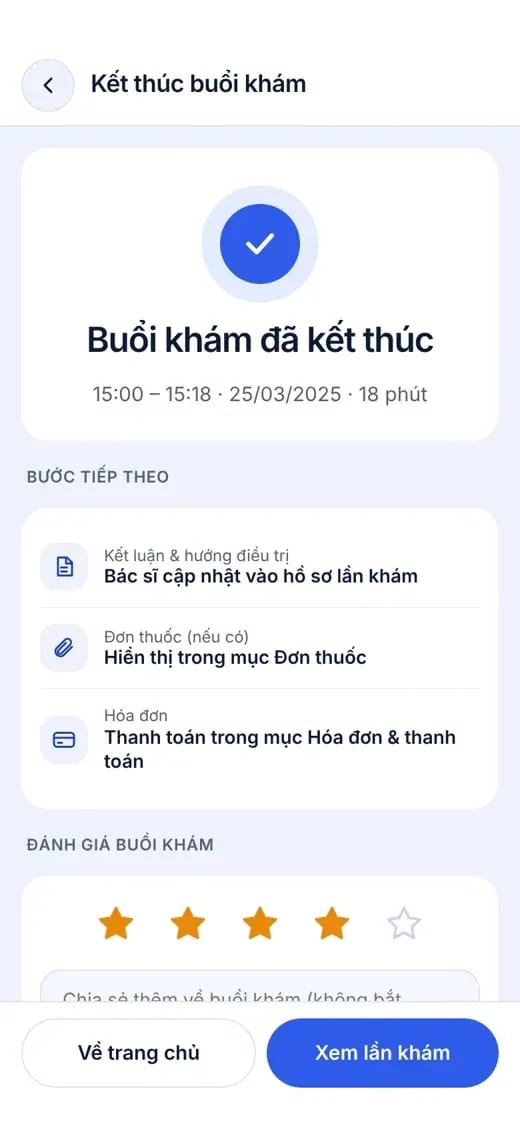
Patient app: After the visit

04Patient feedback

Listen after every visit, improve before the patient leaves

Short questions at the right moment, with responses routed to the person in charge for handling and follow-up.

  • Short questions: a star rating and comments right after the visit.
  • At the right moment: at each point in the service journey.
  • Recipient: the quality manager or the person responsible for patient care.
  • Resolution tracking: dissatisfied feedback is recorded and responded to.

Making a difference

From delivering services to accompanying the patient

The usual approachWith MedAgents
Communicating with patientsPersonal phones and scattered chat groupsOne multichannel inbox, linked to the record
Appointment remindersStaff remember to call backAutomatic reminders on schedule, with tracking of what is left
Post-visit instructionsSpoken instructions and paper slips that are easily lostApproved content in the app, available to review at any time
Between visitsNo contactMedication reminders, measurements and chat when needed
Service feedbackCollected manually, hard to trackAsked at the right time, with someone to act on it

FAQ

Frequently asked questions

Which channel is used for messaging and appointment reminders?

The facility's Zalo OA and Facebook Page, and the patient app. These channels use the facility's own accounts and follow each provider's limits and policies.

Can you be sure the patient read the notification?

The system records delivery status for each channel; whether a patient reads or replies is up to the patient. Cases without a reply are placed in a list for staff to follow up on.

Who writes and approves the guidance content?

The facility writes the content; the clinical lead approves it and records the review date before it is sent to patients.

What does the in-app AI assistant answer?

The assistant supports appointment reminders and explains general information. AI content always carries the notice: “This information is for reference only and does not replace advice from a doctor.” Clinical questions are routed to the medical team.

How is negative feedback handled?

Feedback is routed to the responsible staff member under the facility's process for following up and recording the outcome.

Turn every visit into a long-term relationship

Share your current contact channels and patient journey, and MedAgents proposes a suitable engagement setup.

Compliance commitment
  • Data stored on infrastructure in Vietnam
  • Meets National Prescription data exchange requirements
  • Law 91/2025/QH15 · NĐ 356/2025
  • Information security level 3+ · HIPAA
View security & data